





Ditch PayPal Standard For PayPal Express
If you are running an ecommerce store, accept PayPal as a payment option, and are still using “PayPal Standard” as the integration method, you may want to consider switching to PayPal Express Checkout. The Express method offers many advantages, and is just as easy to implement as PayPal Standard.
The old way: PayPal Standard
Many years ago, before PayPal Express was introduced, ecommerce merchants who wanted to accept PayPal as a payment method simply passed along their PayPal merchant email address in their ecommerce software and the customer was passed off to PayPal to complete the transaction. The flow looks something like this:

PayPal Standard (click image to enlarge)
PayPal then introduced the “Instant Payment Notification” (IPN) service that would allow PayPal to tell an ecommerce application that a payment was complete. This could trigger ecommerce software (like ShopSite®) to mark an order as complete and have it appear as a completed order in the list of orders.
Problems with PayPal Standard
There are a number of issues and problems that can crop up when using PayPal Standard:
- IPN prone to errors
We hear about this all the time. A merchant receives a paypal email stating a payment was made, but the order never appears. This is often attributed to a glitch with PayPal’s IPN service where the notification is never sent to the ecommerce software, or is greatly delayed. This results in the merchant having to contact the customer to get the actual details of what was ordered. In the worst case scenario, the merchant does not notice no order was generated, and the customer is charged but never receives their order.
- Flow of checkout disrupted
With PayPal Standard, the customer is whisked away from the checkout page to PayPal to complete their payment. They are not returned to the thank you page or the merchant’s website. This takes away control from the merchant, as the customer is handed off abruptly.
- Tracking / Analytics may not work
Since the customer is not returned to the thank you screen / receipt page that is normally generated by the ecommerce software, tracking code that normally records the purchase, affiliate commissions, etc… may not work (especially those that rely on the customer hitting a specific page after an order is complete).
Enter PayPal Express Checkout
With PayPal Express, which is free to use for any business account, the process is much more seamless:

PayPal Express Flow (click image to enlarge)
The customer goes from the cart page to PayPal to sign-in, and is then sent right back to the checkout page. They complete their order as a normal credit card payer would on the merchant’s site, and are presented with the normal thank you / receipt page.
PayPal’s sometimes glitchy IPN service is avoided, and PayPal orders appear right away. The merchant has complete control over the process, and the customer is only sent to PayPal to log in and choose a payment method within their PayPal account.
It’s simple to switch
Assuming you have a PayPal Business account, switching to Express Checkout is quite easy. Here is how you would switch if you are using the ShopSite ecommerce software for your website. Other ecommerce platforms are similar in terms of integration:
- 1. In your PayPal account, Create a certificate:
My Account -> Profile -> click API Access -> Request API Credentials -> API SSL client-side certificate
(or with v10 SP1 or newer, you can use the “API Signature”)
- 2. Download and save the certificate. Make note of the API username and password
- 3. In the ShopSite backoffice, go to:
Commerce Setup -> Payment -> Configure PayPal Express Checkout
- 4. Enter your merchant email address, API username/password and paste in the API Certificate:
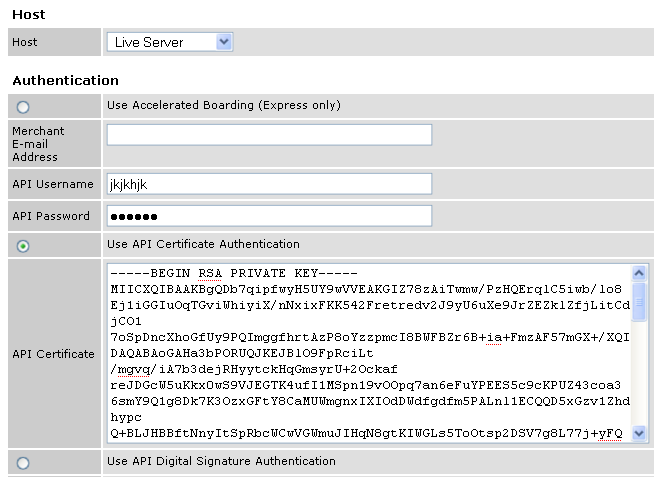
PayPal Express Config (click image to enlarge)
That’s it! You’re now ready to use PayPal Express Checkout.
…
When you consider PayPal Express Checkout is free to use, is easy to setup, and makes the entire purchasing process proceed more smoothly, it’s a “no brainer” decision to switch from Standard to Express.
Looking for a web host that understands ecommerce and business hosting?
Check us out today!






If you switch from PayPal Standard to PayPal Express, and you want the billing phone number to be included on the order, you may need to adjust this setting in your PayPal account under:
Profile -> Website Payment Preferences
“Contact Telephone Number” -> On (Required Field)
PayPal standard can also be configured to return the customer back to your site. I don’t see the difference between express and standard. Express has more forced PayPal branding of your site…which can push customers away.
Both standard and express offer pathetic customization of the paypal checkout page. Basically you can add a header and change the background color…
When using ShopSite with PP Standard, the customer is not shown the ShopSite receipt/thank you page, which is a problem for tracking such as Google Analytics or affiliate tracking.
Express avoids relying on the IPN service of PayPal, which is often glitchy, or does not send the details 100% of the time.
I agree about PP lack of customization on the PP side though.
Is it possible to set up subscription payments with Express as well?
Anton,
Sure, you can setup recurring payments with Express just like with Standard.
Hey,
I keep getting the error message: Paypal Express: 10413::The totals of the cart item amounts do not match order amounts
I guess this has something to do with taxes, here in Holland is the tax 6% food and 19% non-food. Is there a way to fix this?
Looks like this is a bug in opencart:
http://forum.opencart.com/viewtopic.php?f=22&t=21120
I’d start there.
Thanks for the very clear instructions. I just made the changes. Only issue is I can’t figure out how to test what a user sees using PayPal because I only have my business PayPal account and I get an error message trying to “pay” with Pay Pal with that account. Is only other way to test a user end display to set up a personal account with PayPal or ask a friend to test? Thanks again for making this a simple fix.
Amanda,
Glad to hear it was helpful. Yes, to test it, I would either set up a personal PayPal account on a different email address, or ask a friend to test. This way you can see the full process from start to finish to make sure it makes sense to your customers.
Hi,
This was really interesting to read – I have a client currently using PayPal standard, and we have had issues with the order stays defaulting to completed, when it fact it still needs processing (although I posted an explanation of working around this here: http://www.leicestershirewebsitedesign.co.uk/opencart-paypal-status-confusion/).
Ultimately my client plans to switch to PayPal Pro once the account is approved and we’ve set up SSL on the site, but after reading this I can see some clear advantages of PayPal Express, and I have a few old clients that still use the standard PayPal, and we have had some of the issues listed here occur in the past, so I’ll recommend they switch over.
I’m just curious that with the advantages of PayPal Express why PayPal doesn’t force people to use this method, or is that because the standard method is so much simpler to set-up, and they’re worried they could lose or confuse customers straightaway?
Hi
Will you include the new PayPal In-Context experience in the module?